From the team at
The CRM for the whole creative job.
Design, feedback, approvals, publishing, reporting and invoices.
Built inside a creative agency, with your client connected to the work.
Launching winter 2026/27·For freelancers, studios & agencies
Made for your kind of work
One person or a whole studio.
Built inside a creative agencyWe know the work.
We know the work.
We built the CRM.
DooDock grew out of our own work at DooDigital: websites, branding and social media for real clients. The workflows we use every day became the foundation of the CRM.
Changing briefs, feedback rounds, approvals and deadlines are part of creative work everywhere. We built DooDock around those realities, for freelancers, studios and agencies who know them too.
Meet the agency behind DooDockA brief is a conversation.
Good work starts with understanding the client. That context should reach everyone involved in making it.
Start with contextFeedback is part of making.
Every round needs a clear version and a clear decision. Reviews belong with the design so the team knows what comes next.
Make the next step clearHandover is a beginning.
Creative relationships continue after delivery. Clear results and clear invoices make the next client conversation easier.
Build the relationship
The whole client relationshipGood work has a lot
Good work has a lot
going on behind it.
The conversation becomes a brief. The brief becomes the work. Approvals, results and invoices follow the same client through it all.
Win the work.
Keep enquiries, pitches and the next conversation together. Turn a new contact into your next client.
EnquiryDiscoveryQuoteClients & pipelineKeep it moving.
Projects, content, files and your team in one workspace. Every task belongs to the client it is for.
BriefMakeApproveProjects & teamFinish the job.
Show the results in a branded report, send the invoice to the client portal and record the payment.
ReportInvoicePaymentQuotes & invoices
Explore the work around one client.
Browse all featuresYour client. Your whole workspace.
Clients & pipeline
From a company you want to work with to a client you know well.
- Contacts & companies
- Outreach & follow-ups
- Deals & discovery calls
Projects & team
The brief, the board, the whole team.
Give every handover its context. The brief, files and team conversations stay with the project, so the next person can pick up the work.
- Boards and milestones for each client
- Assignees, checklists, files and due dates
- Client budgets that follow completed work
Your client, in the loop
Your client's side of the workspace.
Give your client a clear place to follow the project and find what you share. You choose what they see, straight from the work in your CRM.
- They approve on their phone. Your team sees the decision.
Projects & progress
The milestones and deliverables you choose to share.
Feedback & approvals
Pinned comments, versions and a clear decision.
Files & brand kits
Current files, logos and brand colours ready to use.
Quotes & documents
Quotes and contracts to accept. Invoices to download.
Reports & results
Shared reports and their own analytics when enabled.
Requests & replies
New work requests, with the conversation attached.
Quotes, invoices & budgets
Bill the way you work.
Branding packages, website projects and monthly retainers. Price your services and see what has been paid and what is still due.
- Packages with one-time and monthly line items
- Down-payment and final invoices
- Partial payments, expenses and client budgets
Reporting & insights
Show what the work achieved.
Bring web, search, ads and social results into one dashboard per client. Understand what changed, then send a report that carries your brand into the next conversation.
One dashboard per client
Google Analytics, Search Console, Google Ads, Facebook, Instagram and LinkedIn results together for the period you choose.
An explanation of the numbers
AI Insights reads the client's results and writes up what changed and what stood out, ready for the monthly conversation.
A report you can send
Generate a branded PDF for your date range and let clients see their own analytics in the portal when you enable it.
Design in. Results out.Keep the tools
Keep the tools
you create with.
Bring Canva designs into your posts. Connect your client's channels for publishing and results, and your own Gmail and Google Calendar for the conversations around the work.
- Canva
- Gmail
- Google Calendar
- Google Ads
- Google Analytics
- Search Console


On the web. At home on Mac.
Meet DooDock for MacSame workspace. A native Mac app.
Use the web app wherever you work, or make DooDock at home on your Mac with native shortcuts, windows and file handling. Both use the same client data.
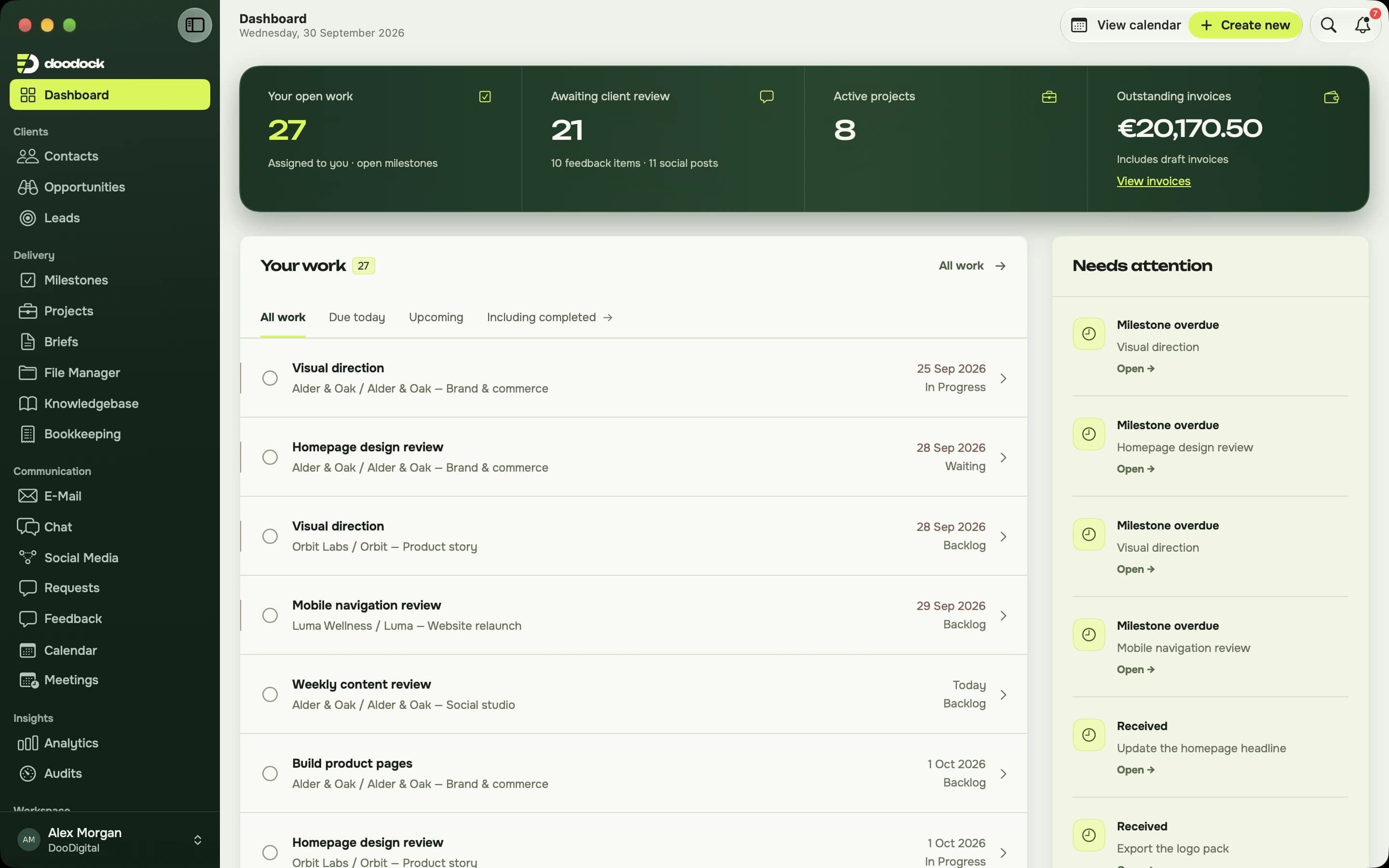
Shortcuts & windows
Find a client with ⌘K and open their record in its own window beside the work.
Quick Look & Finder
Preview designs and PDFs, and drop files from Finder onto a client, task or expense.
Native notifications
Mentions and direct messages reach you as Mac banners while you work in another app.
On the roadmap
More on the way.
Figma, more social channels and connected payments. Planned additions, with the details on our roadmap.
Explore the roadmap- Figma
- TikTok
- X
- Stripe
- Revolut Business
Planned launch pricingChoose the space
Choose the space
your team needs.
Plans grow with your team and active clients. The same tools are included in every plan.
One subscription for your workspaceA lower monthly rate, billed yearly.
Yearly billing selected. Solo: €39 per month. Studio: €149 per month. Agency: €349 per month. Each plan is billed annually.
Your own creative practice
Solo
A home for your clients, your work and everything in between.
€39/ month
€468 billed yearly- 1 team member
- 5 active clients
- Unlimited client logins
- All modules included
A small team, working together
Studio
Keep the whole team and every client moving in the same direction.
€149/ month
€1,788 billed yearly- Up to 5 team members
- 15 active clients
- Unlimited client logins
- All modules included
More people, more moving parts
Agency
Space for a growing team and a fuller roster of clients.
€349/ month
€4,188 billed yearly- Up to 15 team members
- 40 active clients
- Unlimited client logins
- All modules included
Every module. Every plan.
The client portal and unlimited client logins included. No onboarding fee.
AI insights included, subject to fair use.
A little more room?
€12/month per extra team member. €25/month for 5 more active clients.
Running a larger team?
More than 15 people or 40 active clients? Let's talk about Scale.
Planned pricing for winter 2026/27. Plans and limits may change before launch.
A few useful details
Before you jump in.
How is it different from a regular CRM?
A regular CRM tracks deals and leaves the creative work to other tools. DooDock covers the work itself: Canva import, feedback on designs, client approval, publishing and reporting come built in, so you do not need plugins or workarounds to make it fit.
Can I import designs from Canva?
Yes. Connect your Canva account, browse your designs from the post editor, pick the pages and add them. Multi-page designs become a carousel. Figma import is planned.
Where can I publish?
LinkedIn company pages, Facebook pages and Instagram business accounts, straight from the CRM on the date you set. TikTok and X are planned.
Do my clients need an account?
For the portal, yes. You create portal accounts from inside DooDock and your client gets a branded login email. Briefs work without an account: the client opens a link and fills it in.
Web or Mac?
Both. The web app runs in any modern browser, and the Mac app is native, built for macOS. They share the same data.
When can I use it?
DooDock is launching winter 2026/27. People on the waitlist get access first.
Launching winter 2026/27Your next chapter.
Your next chapter.
With fewer tabs.
Get an invite when early access opens. A work email is all you need to save your spot.
Product news only if you ask for it.